
Design tools for Mac
Sample colors, measure layouts, overlay designs.
Color picker, palette libraries, rulers, grids, and design overlay - essential design tools, all in one place.

Color picker
Sample any color on your screen.
Pick colors in the format of your choice. Copy to clipboard or add to a palette library for later use.
See the color pickerScreen ruler
Measure anything on your screen.
Quickly find the distance between elements, or drag to measure their size.
See the screen rulerGrid overlay
Check spacing and alignment.
Show grids over any window to see whether everything lines up the way it was meant to.
See the grid overlay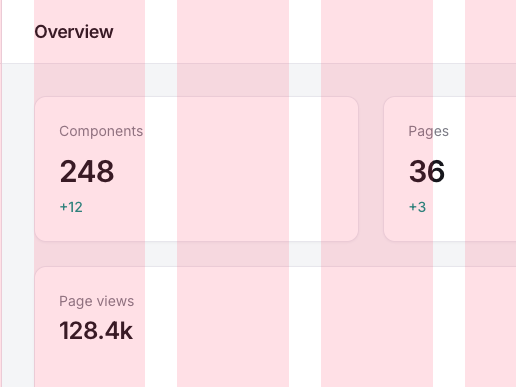
Design overlay
Compare the build to the mockup.
Pin your design on top of the live app, and catch every pixel that drifted from the original.
See the design overlay“It gives me quick access to a bunch of features I use regularly, without having to rely on multiple browser plugins. The grid overlay and window selection are particularly useful. It’s much easier and more accessible than the Chrome extensions I’ve used in the past.”
 Peter TalbotDesign Lead at NE Digital
Make the build match the design.
Sample a color, measure a gap, drop a grid - every tool a keystroke away.
Get release notes
New tools, fixes, and what’s coming next - a short email when there’s something worth saying.
no spam, ever · privacy